Author: Andy Carr

  • Google Listed Six Services an Electrical Supplier Does Not Offer

    Google Listed Six Services an Electrical Supplier Does Not Offer

    On September 18, 2026, I found six inaccurate services in the Google mobile result for Revco Lighting & Electrical Supply’s Bohemia branch: air conditioning repair, outdoor lighting installation, irrigation, plumbing, landscaping and TV mounting. Revco sells electrical and lighting products; it does not perform those services. The claims appeared in the Services section, separate from the AI Overview text, and all six cited Yelp.
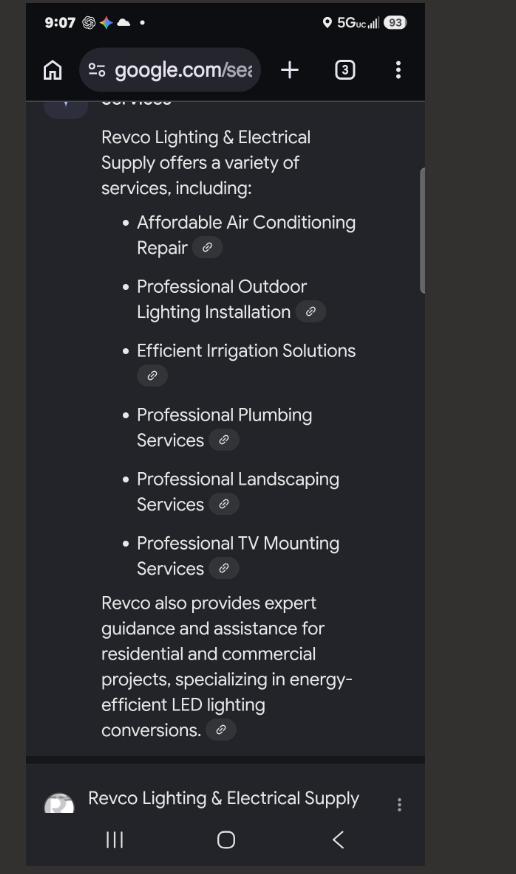
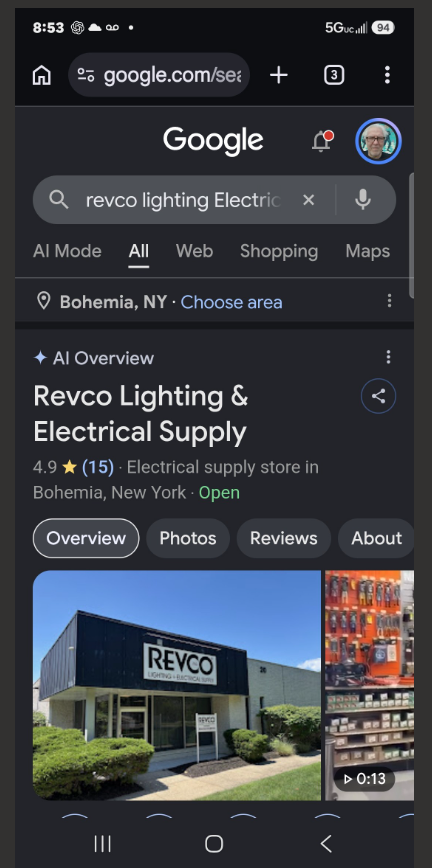
    Left: the separate Services section with six inaccurate claims. Right: the AI Overview label above Bohemia’s business name. Screenshots captured September 18, 2026.

    What appeared across the six branches

    For each branch, I ran the same branded search in three conditions: desktop Chrome Incognito, signed-in desktop Chrome and signed-in mobile Chrome. I stayed on the All results tab and used the same query pattern: “Revco Lighting Electrical Supply [branch town] NY.”

    BranchDesktop IncognitoDesktop signed inMobile signed in
    BohemiaNo AI OverviewWeb GuideAI Overview
    Rocky PointNeitherWeb GuideAI conversation*
    RiverheadNeitherWeb GuideAI Overview
    SoutholdNeitherWeb GuideAI Overview
    East HamptonNeitherWeb GuideAI Overview
    SouthamptonNeitherNeitherNo AI Overview

    “Neither” means I observed neither an AI Overview nor Web Guide in that condition. The mobile column records the business presentation I checked, not every feature on the results page. These are observations from my sessions, not population-level visibility rates.

    *Rocky Point’s screenshots show an expanded Google business conversation with an Ask anything field. They do not show the AI Overview label, so I kept that distinction in the table.

    I found no service inaccuracies in the mobile results I reviewed for Rocky Point, Riverhead, Southold or East Hampton. Southampton showed no AI Overview during its mobile check, and its displayed services were correct. Bohemia was the branch with the six incorrect service claims.

    In Bohemia, Show more opened a detailed view with an Ask anything field. The expanded AI Overview text did not mention air conditioning repair or irrigation. Those claims appeared in the separate Services section. Checking only the overview text would have missed the problem.

    Google describes Web Guide as a Search Labs experiment that uses AI to organize search results. Google also warns that AI Overviews can make mistakes. Its help documentation says Show more opens a detailed view and Ask anything can continue the search in AI Mode. These descriptions help identify what appeared in the screenshots, but they do not explain why the six inaccurate services appeared.

    The differences between desktop and mobile do not establish a cause. I did not isolate account settings, Search Labs enrollment, location, network or device. This review also does not establish whether Google has broadly added AI Overviews to local business panels.

    Following the service citations to Yelp

    All six incorrect service citations in the Bohemia result pointed to Yelp. A separate paragraph about product guidance and energy-efficient LED lighting conversions cited MapQuest and accurately described the business. The sources and accuracy differed within the same result, so I followed each citation instead of treating the page as a single summary.

    On Yelp, the Bohemia profile and a former Miller Place listing tied to Rocky Point displayed electrical installation or replacement and electrical repair under “Verified by Business.” Those service entries were inaccurate. Revco sells electrical and lighting products; it does not perform electrical contracting work.

    Yelp’s Related Searches on the Bohemia page included irrigation, outdoor lighting and TV mounting. These were navigation links to other Yelp search results, not statements that Revco offered those services.

    Hypothesis: Google may have attributed some of the Related Searches wording to Revco when assembling the Services section. The overlap makes that possibility worth investigating, but it does not prove how Google generated the claims. I could not trace all six services to a specific Yelp field or page element.
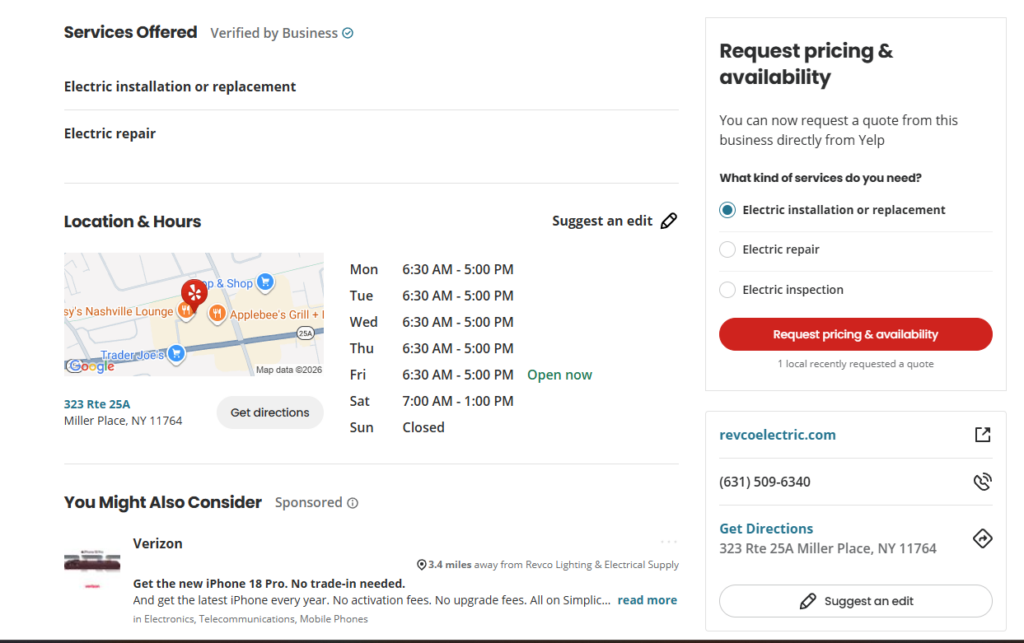
    Yelp listing for the former Miller Place location showing inaccurate electrical installation and repair services under Verified by Business
    The former Miller Place Yelp listing showed inaccurate installation and repair services under “Verified by Business.” The listing was tied to Rocky Point, not Bohemia. Screenshot captured September 18, 2026.

    What I updated and what remains unresolved

    I reviewed all six Yelp listings and submitted edits where needed, including descriptions, service areas, photos, inaccurate service entries and categories. For Bohemia and Rocky Point, I submitted category changes to Wholesalers. A submitted edit is not proof of a public correction, so I checked the listings again before treating any change as verified.

    On recheck, Bohemia’s public Yelp listing showed the Wholesalers category, the correct 20 Orville Drive address and four branch photos. Those changes were publicly visible. The move from the former Miller Place address to 431 Route 25A in Rocky Point was submitted, but I had not yet completed a fresh public verification across all six listings.
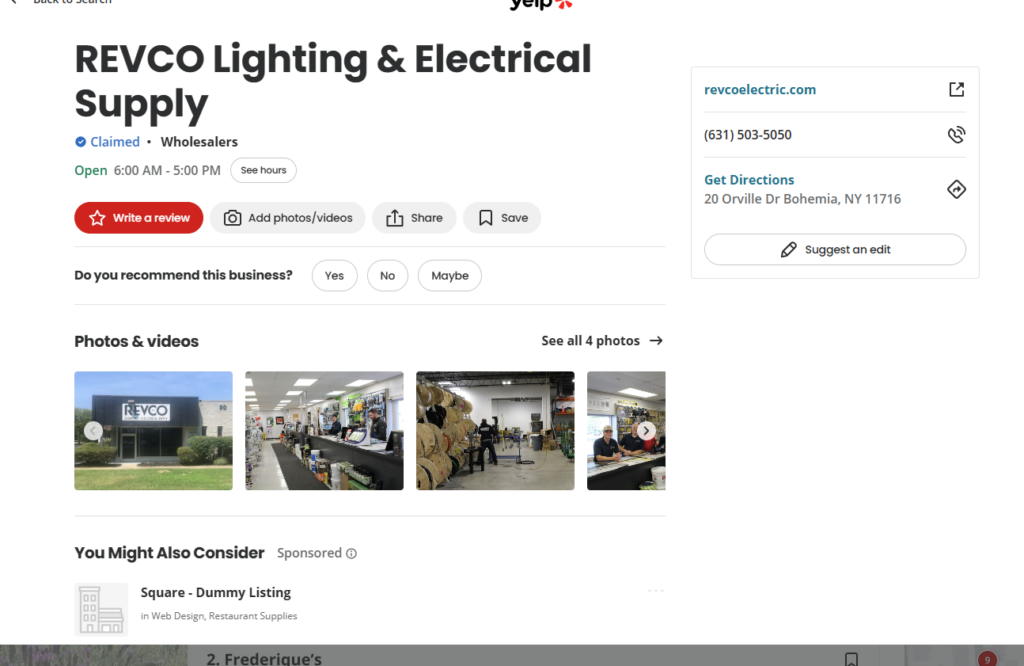
    Updated public Yelp listing for Revco Bohemia showing the Wholesalers category, 20 Orville Drive address and four branch photos
    Publicly verified September 18, 2026: the Bohemia Yelp listing displayed the Wholesalers category, the correct address and four branch photos.

    When I rechecked Google, the six inaccurate service claims still appeared in the Bohemia Services section. I submitted feedback to Google. The Yelp editing work was complete on my side, but a fresh public review of all six Yelp listings and Google results remained outstanding. I have not verified removal of the Google claims or any ranking change.

    A business information check owners can repeat

    A customer could see an inaccurate service and call about work the business does not perform. That is enough reason to investigate. It does not prove lost revenue, ranking damage or a specific cause.

    Google says it compiles Business Profile information from publicly available web content, licensed third-party data, owner and user contributions, and Google’s interactions with businesses. That is why a useful check follows the citations and compares Google with the business website and major listings.

    Owner checklist

    1. Repeat the branded search in desktop Incognito, signed-in desktop and signed-in mobile. Search each location separately.
    2. Check more than the summary. Read the Services section, business type, address, hours and branch identity.
    3. Open every citation. Separate profile facts from ads, reviews, nearby businesses and Related Searches.
    4. Correct sources you control or can claim, then report inaccurate Google content that remains.
    5. Recheck the public results and keep a dated correction log. Mark an issue resolved only when the customer-visible result is corrected.

    If an error appears in an AI Overview, Google provides a feedback process. A submitted report is a request for review, not confirmation that the public result has changed.

    What this review can tell us

    This was a one-day, one-observer review of six branded branch searches. It was not a contractor-query ranking study or a controlled before-and-after test. I checked the Services section separately from the AI Overview text, and the review does not prove how Google generated each entry.

    The narrow finding is straightforward: one branch was shown with six services it does not offer, and every service citation pointed to Yelp. Following those citations uncovered listing errors and a plausible source of confusion, but the mechanism remains unverified. The useful standard is a verified public correction, not a submitted edit or an assumed ranking effect.

    If you want a structured check of how your business is described across Google, Maps, your website and major listings, see the Local Visibility Leak Audit.
  • Fake Phone Numbers in Google Maps Photos: What Local Businesses Should Check

    Fake Phone Numbers in Google Maps Photos: What Local Businesses Should Check

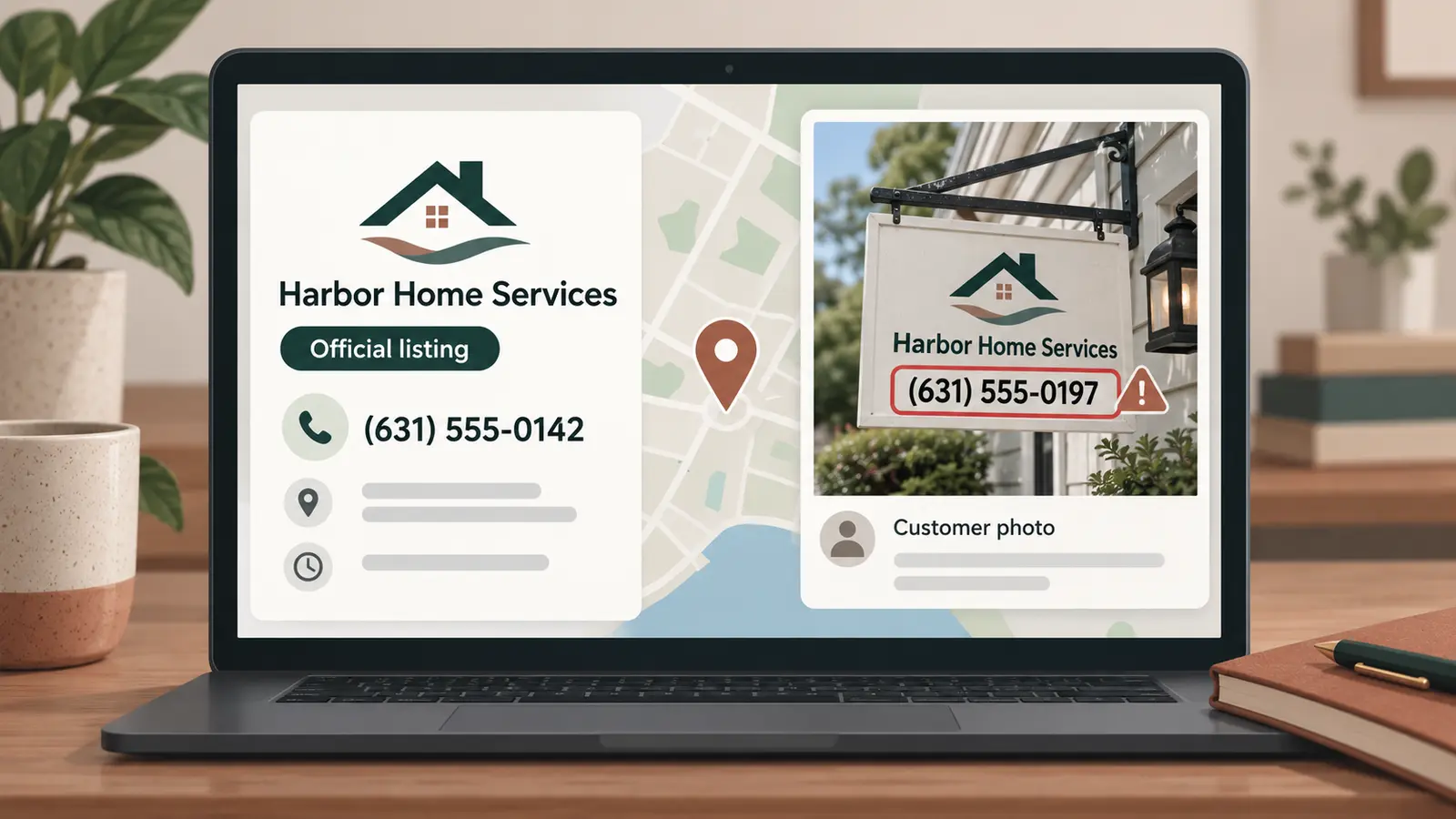
    A business can have the correct phone number on its Google Business Profile and still show customers a different number inside its Google Maps photos.

    That risk was highlighted in a September 10, 2026 report by Search Engine Roundtable about a Google Maps contributor uploading business-themed images containing a phone number that did not belong to the businesses shown. The documented example shared publicly by Sam Sarsten on LinkedIn matters because the false number was part of the image. It did not need to replace the official phone field to mislead someone looking at the listing.

    The evidence does not establish that this is widespread. Google has not announced a new Maps security incident, and the available reporting does not show how many calls were diverted. Local businesses should treat it as a documented tactic worth checking, not as proof that every profile is under attack.

    How can a false number appear when your Business Profile is correct

    Google Maps allows users to contribute photos to eligible businesses and other places. Those images can appear alongside media uploaded by the verified business owner.

    A scammer can therefore create an image that resembles a business advertisement, place the business name on it, add a different phone number, and upload it as a customer contribution. The official phone number in the Business Profile may remain untouched.

    This creates two versions of the business information on the same listing:

    • The official phone number displayed in the Business Profile.
    • A different number displayed visually inside a contributed photo.

    A standard name, address, and phone number check can pass while the misleading image remains visible.

    Google’s Maps policies prohibit content that impersonates an organization, misrepresents a business, or distorts information to scam users. Google also states that contributions should accurately represent the location or product in question. The policy is clear. Detecting and removing every violating image is a separate operational problem.

    This is separate from the website and Search practices covered in Fieldmark Local’s August 2026 Google spam update guide. Here, the immediate concern is contradictory contact information inside customer-visible media.

    Why local service businesses should take this seriously

    The practical risk is highest when someone is trying to contact a business quickly. A homeowner dealing with a pest problem, electrical failure, plumbing leak, lockout, towing need, or HVAC breakdown may call the first number that appears credible.

    The customer may not notice that a polished image was uploaded by an outside contributor. If the image contains the correct company name, familiar service language, and a prominent phone number, it can look authoritative even though it is not controlled by the business.

    The possible damage extends beyond one missed lead. A caller may believe the person answering represents the real company. That can create confusion about pricing, scheduling, payment, warranties, or whether the company ever received the call.

    This is why Fieldmark Local treats local visibility as the complete customer-facing record. The editable Business Profile fields matter, but so do photos, reviews, third-party listings, search results, and other information a customer may use to choose or contact the business.

    Run a photo contact integrity check

    1. View the business as a customer

    Search for the business by name in Google Search and Google Maps. Check both desktop and mobile results when possible because the order and prominence of photos can differ.

    Do not stop after confirming the official phone number. Open the full photo gallery.

    2. Inspect photos for contact information

    Look for images containing:

    • Phone numbers
    • Website addresses
    • QR codes
    • Email addresses
    • Business names or logos
    • Coupons, prices, or urgent calls to action

    Compare every visible contact detail with the official business website and Business Profile. A different number or domain deserves investigation even if the rest of the image looks legitimate.

    3. Identify who uploaded the image

    Open the contributor’s profile when that information is available. Google says other users can view a contributor’s public Maps photos and reviews.

    One unrelated image can be an honest mistake. Similar promotional images, repeated phone numbers, or contributions to many unrelated businesses can indicate a broader pattern. Capture that pattern before reporting it.

    4. Preserve evidence before reporting

    Take screenshots showing:

    • The business listing and date checked
    • The complete suspicious image
    • The false phone number, URL, or QR code
    • The contributor’s name or profile
    • Similar contributions when a pattern is visible
    • The business’s correct contact information

    Do not call the suspicious number merely to test it. The purpose of the audit is to document contradictory information without creating unnecessary contact with a possible scam operation.

    5. Report the photo

    Google’s desktop instructions say to open the business in Maps, open the photo gallery, select the image, choose the three-dot menu, and select “report a problem.”

    Choose the reason that most accurately describes the violation. A false phone number presented as belonging to the business may fall under misrepresentation, impersonation, fake engagement, or another available reporting category. Report what the evidence shows rather than trying to make the complaint sound more severe.

    6. Report the contributor when the pattern warrants it

    Reporting one image addresses one piece of content. If the contributor profile shows repeated policy violations, Google also provides a procedure for reporting the profile through the Google Maps mobile app.

    Only report a contributor when the public activity provides a reasonable basis. An image you dislike is not automatically a policy violation.

    7. Verify the outcome

    Record the date reported and recheck the listing. Google notes that profile reviews can take several days, and removal is not guaranteed merely because a report was submitted.

    If the image remains visible, preserve the case details and consider using Google’s help community or Business Profile support path. Continue checking the listing while the matter is unresolved.

    What business owners should not change

    Do not alter the correct Business Profile phone number because a different number appears inside a contributed photo. Changing accurate profile information can create an additional inconsistency without addressing the offending image.

    Do not upload a large collection of repetitive graphics to bury the suspicious photo. Google prohibits repetitive and promotional content in several contexts, and flooding the gallery does not remove the underlying problem.

    Do not publicly accuse a named contributor of criminal activity unless that conclusion is supported by appropriate evidence and handled through the proper channels. Document the visible behavior and report the policy violation.

    This belongs in a recurring local visibility audit

    Most Business Profile checklists concentrate on hours, categories, reviews, services, and the official phone number. Those checks remain important, but they do not account for contradictory information inside user-contributed media.

    A useful monitoring process should answer three questions:

    1. Is the business’s official information correct?
    2. Is conflicting information visible elsewhere on the listing?
    3. Can a customer tell which information is authoritative?

    That broader check turns a profile review into a customer-view audit. For a local service business, the distinction matters because a listing can be technically accurate while still presenting a misleading path to contact the company.

    As of September 10, 2026, the available evidence supports checking for this tactic. It does not support calling it a widespread national outbreak. Fieldmark Local will update this guidance if Google confirms a larger pattern, changes its reporting tools, or publishes more specific instructions for fraudulent contact information embedded in Maps photos.

    Frequently asked questions

    Can someone change my phone number through a Google Maps photo?

    A contributed photo cannot directly replace the official phone field merely by displaying a number. It can still mislead a customer because the different number is visible inside the image.

    Can a business owner delete a photo uploaded by another Google Maps user?

    Google says users can directly delete only media they uploaded themselves. A business owner can report or request removal of someone else’s photo through Google Maps.

    Should I report the contributor as well as the image?

    Report the contributor when the public profile shows a credible pattern of policy violations. Google warns against reporting users merely because their accurate, relevant content is unwelcome.

    Sources

    • Search Engine Roundtable: Google Maps contributor photo phone-number scam, September 10, 2026
    • Original documented example shared by Sam Sarsten
    • Google Maps Help: Add, remove, share, and report photos or videos
    • Google Maps user-generated content policy

    About the author

    Andy Carr is the founder of Fieldmark Local. He has more than 25 years of experience in digital marketing, search, analytics and eCommerce, and previously operated a pest-control company for nine years.

  • We Tested Google Ask Maps Across 30 Suffolk County Pest Control Searches. Here’s What Changed

    We Tested Google Ask Maps Across 30 Suffolk County Pest Control Searches. Here’s What Changed

    TL;DR: Fieldmark Local ran 30 Ask Maps searches across Huntington, Patchogue and Riverhead. As prompts became more specific, the recommendation set changed by an average of 63.6%. When we repeated the exact prompts in a second round, the lists matched by only 61.5% on average. In this test, Ask Maps behaved like a dynamic recommendation system, not a fixed local-business list. The results do not establish ranking factors or predict what every user will see.

    Google is turning Maps into a conversational discovery tool. In its August 6 Ask Maps update, Google described new capabilities for ordering food, finding hotels and events, receiving personalized answers and resuming past conversations. The company’s March introduction to Ask Maps described it as a way to ask complex, real-world questions and receive a customized map instead of manually sorting through place listings and reviews.

    That creates a practical measurement problem for local service businesses. A homeowner can start with a broad request for pest control companies, then add a pest type, reputation requirement, service preference or description of what is happening inside the house. Each added detail may change which businesses are presented and how they are described.

    Fieldmark Local built a two-round observational test to measure three things: how much the recommendation set changed as a prompt became more specific, how closely an identical prompt repeated in a second round, and whether the claims used to justify those recommendations were supported by public evidence.

    How did Fieldmark Local test Ask Maps?

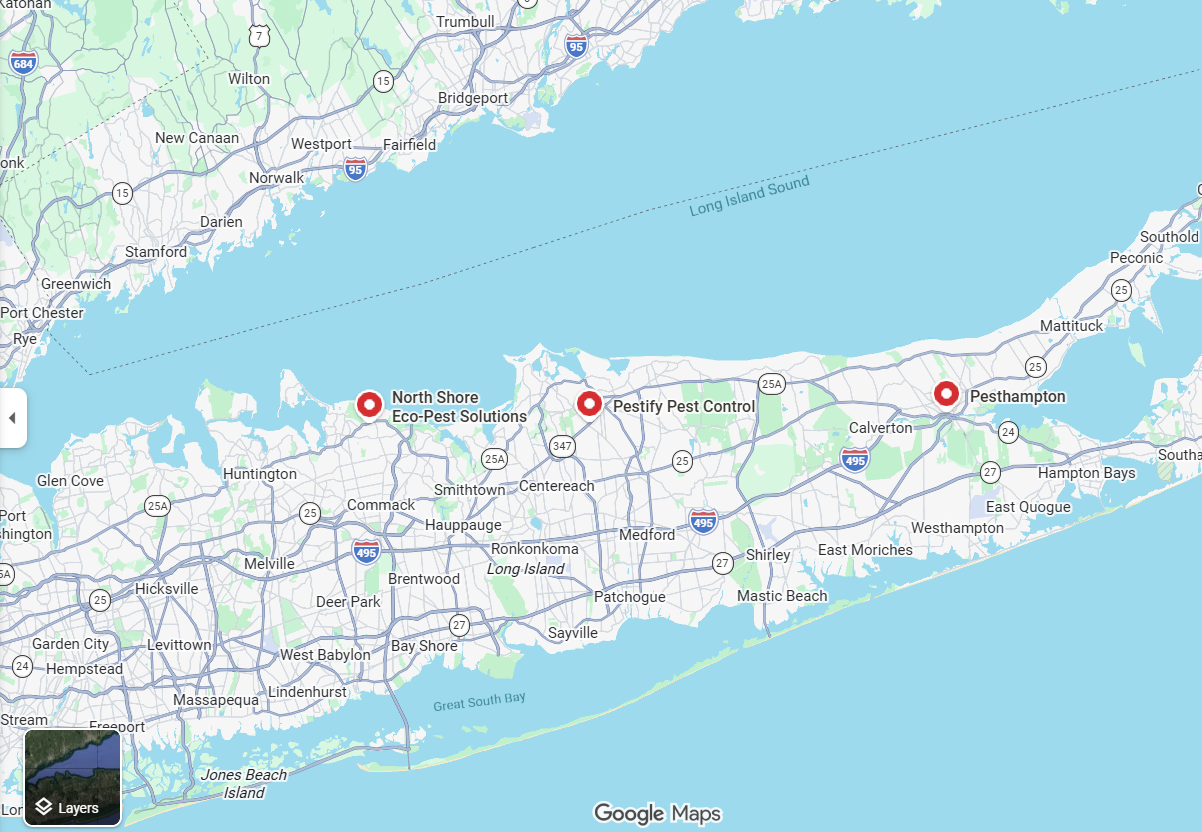
    The test covered Huntington, Patchogue and Riverhead in Suffolk County, New York. All 30 searches were performed on September 6, 2026. Round 1 began at 11:00 a.m. ET, and Round 2 began at 6:00 p.m. ET. We ran 15 prompts in Round 1 and repeated the same 15 prompts in Round 2. Each town used five levels of specificity:

    • Level 1: A broad request for pest control companies in the town.
    • Level 2: A request for a company that handles carpenter ants.
    • Level 3: Carpenter-ant service plus strong customer reviews.
    • Level 4: Carpenter-ant service plus customer comments about clear communication and reliable work.
    • Level 5: A natural homeowner scenario involving possible carpenter ants around a window.

    Every run started in a new Ask Maps conversation. We used the same Google account, browser, device and physical location, copied each prompt exactly, and captured the full written response and screenshot before researching any recommended business. Across all 30 runs, Ask Maps returned 144 named recommendations representing 29 unique businesses.

    Set change measured how many unique business names were different between a specific prompt and that town’s broad Level 1 result. Same-prompt similarity measured the businesses shared by both rounds divided by all unique businesses returned across those two runs. These measures compare membership, not the order in which businesses appeared.

    After capture, we reviewed the official websites and supplied Google Maps or Business Profile links for all 29 businesses. The claim review also checked service-area support separately for each town in which a company was recommended, producing 38 business-town checks.

    How much did a more specific question change the recommendations?

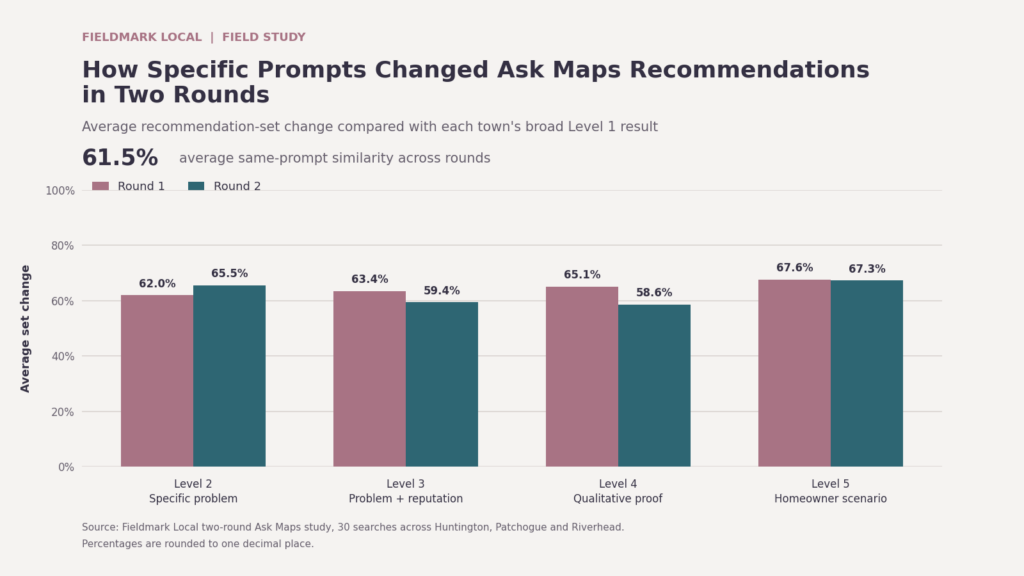
    A great deal. Compared with each town’s broad Level 1 result, the recommendation set changed by 64.5% on average in Round 1 and 62.7% in Round 2. The combined average was 63.6%.

    Study measureRound 1Round 2Combined
    Completed runs151530
    Named recommendations7668144
    Average recommendations per run5.14.54.8
    Average set change vs. Level 164.5%62.7%63.6%
    Level 1 businesses still present at Level 543.8%53.8%48.3%
    Level 5 newcomers vs. Level 150.0%56.3%53.3%
    Same-prompt similarity across roundsN/AN/A61.5%

    Source: Fieldmark Local two-round Ask Maps study. Percentages are rounded to one decimal place.

    Bar chart comparing average Ask Maps recommendation-set changes in Round 1 and Round 2 for prompt Levels 2 through 5.

    The effect was strongest in the most natural prompt. At Level 5, the average set change reached 67.6% in Round 1 and 67.3% in Round 2. Across both rounds, only 48.3% of businesses from the broad result remained in the Level 5 result. At the same time, 53.3% of Level 5 recommendations were businesses that had not appeared in that town’s broad list for that round.

    A single broad query therefore provided an incomplete picture of visibility in this test. A business missing from the general list could appear when the request described a specific pest or customer concern. A company visible in the broad list could disappear as those constraints were added. The study does not identify what caused any individual change, but the shift itself repeated in both rounds.

    Did Ask Maps return the same businesses when we repeated a prompt?

    Only partly. Identical prompts produced 61.5% average recommendation-set similarity across the two rounds. Broad Level 1 prompts were the most stable at 74.6%. Level 4 prompts, which added qualitative requirements about communication and reliability, were the least stable at 34.4%. Level 5 homeowner scenarios reached 66.7% similarity.

    The individual lists moved more than the overall candidate pool. Round 2 returned 23 unique businesses, and every one of them had appeared somewhere in Round 1. Six, however, appeared under a different test town. Four businesses were unusually durable and appeared in all ten prompts for their assigned town across both rounds.

    A reasonable interpretation is that Ask Maps assembled changing lists from a substantially overlapping pool of businesses. The test cannot isolate whether a particular change came from personalization, live data, model behavior, location handling or another system input.

    What kinds of claims did Ask Maps use to explain its choices?

    Ask Maps did more than return company names. It supplied detailed explanations about why each business appeared suitable. When we consolidated those statements across the 29 business profiles, the most common claim categories were structural diagnosis or exclusion for 23 businesses, thoroughness or inspection for 18, carpenter-ant expertise for 18, communication or transparency for 16, and response speed for 16.

    Google says Maps can analyze information about hundreds of millions of places, including community reviews, when answering questions. That helps explain why the responses often sounded specific and customer-informed. It does not tell us which source produced a particular sentence or whether any one attribute caused the recommendation. For a broader operational review, use Fieldmark Local’s Google AI visibility checklist.

    How well did the recommendation claims hold up?

    The business-level review produced 17 Verified profiles, seven Weakly Supported profiles and five Mixed profiles. Verified means the material recommendation claims were supported by accessible official website or Google Business Profile evidence. Weakly Supported means the core service or coverage was supported, but specific review-derived language or another detail could not be fully confirmed. Mixed means important claims were supported while another meaningful detail conflicted with, or was not established by, the available evidence.

    The review found practical examples of why verification matters:

    • One business was described as operating 24 hours even though its official site listed service hours of 7 a.m. to 7 p.m.
    • A local operating-history claim could not be confirmed on the company’s official franchise page.
    • One Google Business Profile carried the expected business title, while visible review summaries and owner responses repeatedly named another brand, making review attribution unreliable.
    • Several service-area statements extended beyond the towns clearly supported by the official website.

    None of the 29 profiles was classified as wholly Incorrect or Unverified. That does not mean every sentence in the 144 recommendation occurrences was correct. The classifications summarize the combined claim profile for each unique business, and several profiles contained individual statements that should not be repeated without qualification.

    What should a local service business do with these findings?

    1. Test more than one customer question

    Run a small, repeatable set of prompts that reflects how customers actually describe the job. Include a broad category request, an important service, a reputation requirement and a natural scenario. Repeat the same prompts later. Record the account, device, location, date and exact wording so changes can be interpreted responsibly.

    2. Describe real services in customer language

    A page that says only ‘pest control’ gives customers little help with a carpenter-ant problem around a window. Explain the actual services offered, the situations technicians handle, inspection steps, service limitations and what happens next. Keep the language accurate and readable. Do not add services or towns simply because they appeared in a test prompt.

    3. Reconcile hours, service areas and company history

    Compare the website, Google Business Profile and important third-party listings. Correct conflicting hours, old brand names, unsupported service areas and inconsistent descriptions of ownership or operating history. These issues can confuse customers even when they do not affect whether Ask Maps displays the business.

    4. Build evidence around important claims

    Support meaningful statements with information a customer can verify: service details, licenses or credentials where relevant, clear policies, real job photos, technician explanations and authentic reviews. Ask customers for honest feedback in their own words. Do not script reviews or manufacture examples designed to echo a target prompt.

    5. Treat a visibility test as evidence, not a verdict

    One query can miss a business that appears under a more specific request. One successful result can also disappear in a later run. Track patterns, preserve screenshots and compare the public explanation with the facts the business can document. Avoid major site or profile changes based on a single response.

    What does this study not prove?

    This was a controlled observational test from one account, browser, device and physical location. New conversations were used for every prompt, but account-level history remained available. In one Round 2 response, Ask Maps explicitly indicated that two recommendations had been previously viewed or searched. The rounds should not be described as fully independent.

    The study also involved one partial text capture. Its five-business set was recovered from the first written name and four map pins, but most explanations and the order after the first result were unavailable. A separate response omitted one company name from the narrative, so the business was identified from the matching map pin.

    The results apply to this pest-control test in three Suffolk County towns. They do not establish a universal Ask Maps ranking system, isolate a causal input or predict what another account will receive. Ask Maps is also changing quickly, so this study should be treated as a documented snapshot that can be repeated and compared over time.

    The practical takeaway

    Ask Maps visibility was prompt-sensitive and only moderately repeatable in this study. A business could appear in a broad request and fall out when the homeowner added a specific need. Another business could be absent from the broad list and enter when the question described the actual problem. The accompanying explanations also carried specific claims about expertise, availability, service areas and reputation that did not always match public evidence cleanly.

    Local companies should make their services, coverage and proof easy to verify, then monitor what customers are actually being shown. Fieldmark Local’s Local Visibility Leak Audit compares the business a company operates with what appears across Google, Maps, websites, reviews, listings and selected AI-search experiences. See how the audit applies to pest control companies or request an Audit Fit Check.

    About the author

    Andy Carr is the founder of Fieldmark Local. He has more than 25 years of experience in digital marketing, search, analytics and eCommerce, and previously operated a pest-control company for nine years. That background informed the study’s customer scenarios and its review of service, coverage and reputation claims.