
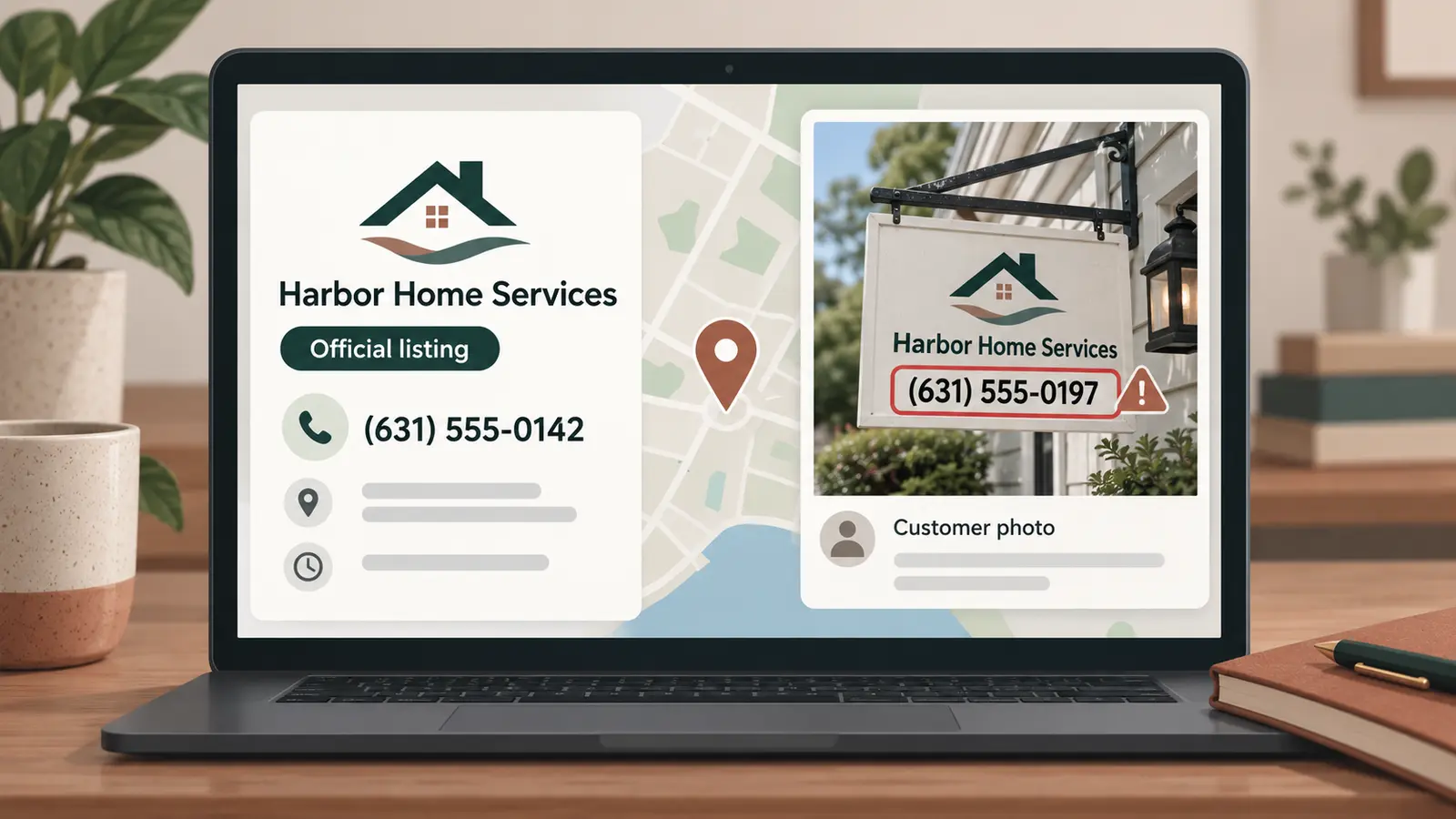
A business can have the correct phone number on its Google Business Profile and still show customers a different number inside its Google Maps photos.
That risk was highlighted in a September 10, 2026 report by Search Engine Roundtable about a Google Maps contributor uploading business-themed images containing a phone number that did not belong to the businesses shown. The documented example shared publicly by Sam Sarsten on LinkedIn matters because the false number was part of the image. It did not need to replace the official phone field to mislead someone looking at the listing.
The evidence does not establish that this is widespread. Google has not announced a new Maps security incident, and the available reporting does not show how many calls were diverted. Local businesses should treat it as a documented tactic worth checking, not as proof that every profile is under attack.
How can a false number appear when your Business Profile is correct
Google Maps allows users to contribute photos to eligible businesses and other places. Those images can appear alongside media uploaded by the verified business owner.
A scammer can therefore create an image that resembles a business advertisement, place the business name on it, add a different phone number, and upload it as a customer contribution. The official phone number in the Business Profile may remain untouched.
This creates two versions of the business information on the same listing:
- The official phone number displayed in the Business Profile.
- A different number displayed visually inside a contributed photo.
A standard name, address, and phone number check can pass while the misleading image remains visible.
Google’s Maps policies prohibit content that impersonates an organization, misrepresents a business, or distorts information to scam users. Google also states that contributions should accurately represent the location or product in question. The policy is clear. Detecting and removing every violating image is a separate operational problem.
This is separate from the website and Search practices covered in Fieldmark Local’s August 2026 Google spam update guide. Here, the immediate concern is contradictory contact information inside customer-visible media.
Why local service businesses should take this seriously
The practical risk is highest when someone is trying to contact a business quickly. A homeowner dealing with a pest problem, electrical failure, plumbing leak, lockout, towing need, or HVAC breakdown may call the first number that appears credible.
The customer may not notice that a polished image was uploaded by an outside contributor. If the image contains the correct company name, familiar service language, and a prominent phone number, it can look authoritative even though it is not controlled by the business.
The possible damage extends beyond one missed lead. A caller may believe the person answering represents the real company. That can create confusion about pricing, scheduling, payment, warranties, or whether the company ever received the call.
This is why Fieldmark Local treats local visibility as the complete customer-facing record. The editable Business Profile fields matter, but so do photos, reviews, third-party listings, search results, and other information a customer may use to choose or contact the business.
Run a photo contact integrity check
1. View the business as a customer
Search for the business by name in Google Search and Google Maps. Check both desktop and mobile results when possible because the order and prominence of photos can differ.
Do not stop after confirming the official phone number. Open the full photo gallery.
2. Inspect photos for contact information
Look for images containing:
- Phone numbers
- Website addresses
- QR codes
- Email addresses
- Business names or logos
- Coupons, prices, or urgent calls to action
Compare every visible contact detail with the official business website and Business Profile. A different number or domain deserves investigation even if the rest of the image looks legitimate.
3. Identify who uploaded the image
Open the contributor’s profile when that information is available. Google says other users can view a contributor’s public Maps photos and reviews.
One unrelated image can be an honest mistake. Similar promotional images, repeated phone numbers, or contributions to many unrelated businesses can indicate a broader pattern. Capture that pattern before reporting it.
4. Preserve evidence before reporting
Take screenshots showing:
- The business listing and date checked
- The complete suspicious image
- The false phone number, URL, or QR code
- The contributor’s name or profile
- Similar contributions when a pattern is visible
- The business’s correct contact information
Do not call the suspicious number merely to test it. The purpose of the audit is to document contradictory information without creating unnecessary contact with a possible scam operation.
5. Report the photo
Google’s desktop instructions say to open the business in Maps, open the photo gallery, select the image, choose the three-dot menu, and select “report a problem.”
Choose the reason that most accurately describes the violation. A false phone number presented as belonging to the business may fall under misrepresentation, impersonation, fake engagement, or another available reporting category. Report what the evidence shows rather than trying to make the complaint sound more severe.
6. Report the contributor when the pattern warrants it
Reporting one image addresses one piece of content. If the contributor profile shows repeated policy violations, Google also provides a procedure for reporting the profile through the Google Maps mobile app.
Only report a contributor when the public activity provides a reasonable basis. An image you dislike is not automatically a policy violation.
7. Verify the outcome
Record the date reported and recheck the listing. Google notes that profile reviews can take several days, and removal is not guaranteed merely because a report was submitted.
If the image remains visible, preserve the case details and consider using Google’s help community or Business Profile support path. Continue checking the listing while the matter is unresolved.
What business owners should not change
Do not alter the correct Business Profile phone number because a different number appears inside a contributed photo. Changing accurate profile information can create an additional inconsistency without addressing the offending image.
Do not upload a large collection of repetitive graphics to bury the suspicious photo. Google prohibits repetitive and promotional content in several contexts, and flooding the gallery does not remove the underlying problem.
Do not publicly accuse a named contributor of criminal activity unless that conclusion is supported by appropriate evidence and handled through the proper channels. Document the visible behavior and report the policy violation.
This belongs in a recurring local visibility audit
Most Business Profile checklists concentrate on hours, categories, reviews, services, and the official phone number. Those checks remain important, but they do not account for contradictory information inside user-contributed media.
A useful monitoring process should answer three questions:
- Is the business’s official information correct?
- Is conflicting information visible elsewhere on the listing?
- Can a customer tell which information is authoritative?
That broader check turns a profile review into a customer-view audit. For a local service business, the distinction matters because a listing can be technically accurate while still presenting a misleading path to contact the company.
As of September 10, 2026, the available evidence supports checking for this tactic. It does not support calling it a widespread national outbreak. Fieldmark Local will update this guidance if Google confirms a larger pattern, changes its reporting tools, or publishes more specific instructions for fraudulent contact information embedded in Maps photos.
Frequently asked questions
Can someone change my phone number through a Google Maps photo?
A contributed photo cannot directly replace the official phone field merely by displaying a number. It can still mislead a customer because the different number is visible inside the image.
Can a business owner delete a photo uploaded by another Google Maps user?
Google says users can directly delete only media they uploaded themselves. A business owner can report or request removal of someone else’s photo through Google Maps.
Should I report the contributor as well as the image?
Report the contributor when the public profile shows a credible pattern of policy violations. Google warns against reporting users merely because their accurate, relevant content is unwelcome.
Sources
- Search Engine Roundtable: Google Maps contributor photo phone-number scam, September 10, 2026
- Original documented example shared by Sam Sarsten
- Google Maps Help: Add, remove, share, and report photos or videos
- Google Maps user-generated content policy
About the author
Andy Carr is the founder of Fieldmark Local. He has more than 25 years of experience in digital marketing, search, analytics and eCommerce, and previously operated a pest-control company for nine years.